
Shopify vs Squarespace (2026): Pricing, Fees, SEO & Which Is Better?

Independent analysis based on official pricing documentation, payment-processor rates, published platform data, and seller community discussions. I don’t sell either platform. Some links are affiliate links they don’t change the numbers or the verdict. Last verified June 2026.
Shopify vs Squarespace usually gets framed as “ecommerce platform vs website builder,” and then the writer picks a side. This analysis takes a different approach. I reviewed both official pricing pages, modeled what a real store actually pays at $5k, $20k, and $100k a month, and checked the marketing claims against the fee documentation.
The short version is the surprising part: on raw cost, Squarespace usually wins — even at volume. Shopify still makes sense for a lot of sellers, but not for the reason most comparison posts give. Here’s the whole picture, with the math shown.
Quick answer box
Pick Shopify if you’re building a real product store, plan to scale, sell internationally, dropship, or need a deep app ecosystem. It costs a little more but does far more.
Pick Squarespace if you want a beautiful site with light-to-moderate selling, you’re a creator or service business, or design matters more than selling tools. It’s cheaper and easier to start.
The honest twist: Squarespace is often the cheaper platform. Shopify wins on capability-per-dollar and on what it lets you earn — not on a lower monthly bill.
Shopify vs Squarespace at a glance
| Factor | Shopify | Squarespace |
|---|---|---|
| Built for | Selling products | Building beautiful sites |
| Entry store plan (annual) | Basic ~$29/mo | Core ~$23/mo |
| Extra platform transaction fee | 0% with Shopify Payments | 0% on Plus/Advanced; entry tier may carry a % fee |
| Payment processing | 2.9%→2.15% + 30¢ by plan | ~2.9% (2.7% on Plus/Advanced) + 30¢ |
| App / extension ecosystem | Thousands (commonly cited ~8,000+) | A few dozen extensions |
| Design out of the box | Good, improving | Excellent |
| Ease of use | Moderate learning curve | Easier for beginners |
| Best at | Scaling ecommerce | Content + light commerce |
| International selling | Strong (multi-currency, tax) | Limited |
That table is where most articles stop. The interesting part is underneath it.
Sources: official Shopify pricing page; official Squarespace pricing page; published payment-processor rate documentation.
Who should choose Shopify or Squarespace?
If you want the answer in ten seconds, find your row.
| You are a… | Winner | Why |
|---|---|---|
| Beginner | Squarespace | Gentler learning curve, polished defaults, lower entry cost. |
| Blogger | Squarespace | Stronger native blogging and content tools. |
| Creator (portfolio, art, photography) | Squarespace | Best-in-class templates and image handling. |
| Small business | Depends | Squarespace if light selling; Shopify if products drive revenue. |
| Scaling ecommerce | Shopify | Apps, conversion tools, and headroom to grow. |
| Dropshipper | Shopify | Deep app/integration ecosystem built for it. |
| Agency (client stores) | Shopify | Partner program, repeatability, broader capability. |
| Local business (bookings/services) | Squarespace | Built-in scheduling, simpler setup for a service site. |
The pattern is simple: selling and scaling lean Shopify; design, content, and simplicity lean Squarespace. The rest of this guide is the evidence behind each call.
Sources: official Shopify and Squarespace feature documentation; seller community discussions.
Shopify vs Squarespace Cost Calculator
Pick your plans and enter your numbers. You'll see the exact fees behind every total — plan, processing rate, per-order charge, transaction fees, apps, and email — not just a final number.
—
Enter your numbers to see the breakdown.
| Platform | Plan fee | Processing | Transaction | Apps | Total | |
|---|---|---|---|---|---|---|
| Shopify | $0 | $0 | $0 | $0 | $0 | $0 |
| Squarespace | $0 | $0 | $0 | $0 | $0 | $0 |
What each plan charges
The fees this calculator uses. Your selected plans are highlighted. Processing applies on every sale; the third-party surcharge only applies on Shopify if you skip Shopify Payments.
| Plan | Monthly fee | Processing | Extra transaction fee |
|---|---|---|---|
| Shopify | |||
| Basic | $29 | 2.9% + 30¢ | 0% (Shopify Payments) / 2% third-party |
| Grow | $105 | 2.7% + 30¢ | 0% / 1% third-party |
| Advanced | $399 | 2.5% + 30¢ | 0% / 0.5% third-party |
| Squarespace | |||
| Core | $23 | 2.9% + 30¢ | 0% platform fee |
| Plus | $39 | 2.7% + 30¢ | 0% platform fee |
| Advanced | $99 | 2.7% + 30¢ | 0% platform fee |
This calculator uses publicly available pricing and payment-processing rates. Actual costs may vary depending on your plan, apps, and payment provider.
+ About these estimates
This is an independent estimating tool for general information only — it is not financial advice, and it is not affiliated with, authorized by, or endorsed by Shopify or Squarespace. Results are approximate and depend on the figures you enter.
Figures use publicly available US pricing in USD, annual-effective, verified June 2026. Both platforms change pricing and rename plans periodically, so always confirm current rates on the official pages: Shopify pricing and Squarespace pricing. (Pricing pages geo-adjust by location — set the region to United States to match.)
Estimates exclude sales tax, promotional discounts, one-time costs, premium themes/domains, currency conversion, and monthly-billing surcharges. Squarespace's entry commerce tier (Core) has had its transaction-fee treatment reported inconsistently since the 2025 plan rename; this tool models commerce plans at 0% platform fee — verify before relying on the Core figure. Payment-processing rates can vary by region and card type.
The real cost: what you actually pay (not the sticker price)
The short answer: Squarespace is usually the cheaper platform — not Shopify. Most articles get this wrong.
Why most comparisons miss it: they compare entry prices and stop there. Shopify starts at $29/month, Squarespace at $16. That part’s true. But nobody runs a store on the entry price — your real bill includes the monthly plan, payment processing fees, and any apps you install.
When you add all of that up, Squarespace actually tends to come out cheaper across the board.
Here’s a simple way to think about the real cost:
- The monthly plan — what you pay to use the platform
- Payment processing — a small percentage taken from every sale (both platforms charge this; it’s unavoidable)
- Apps — optional add-ons that extend what your store can do
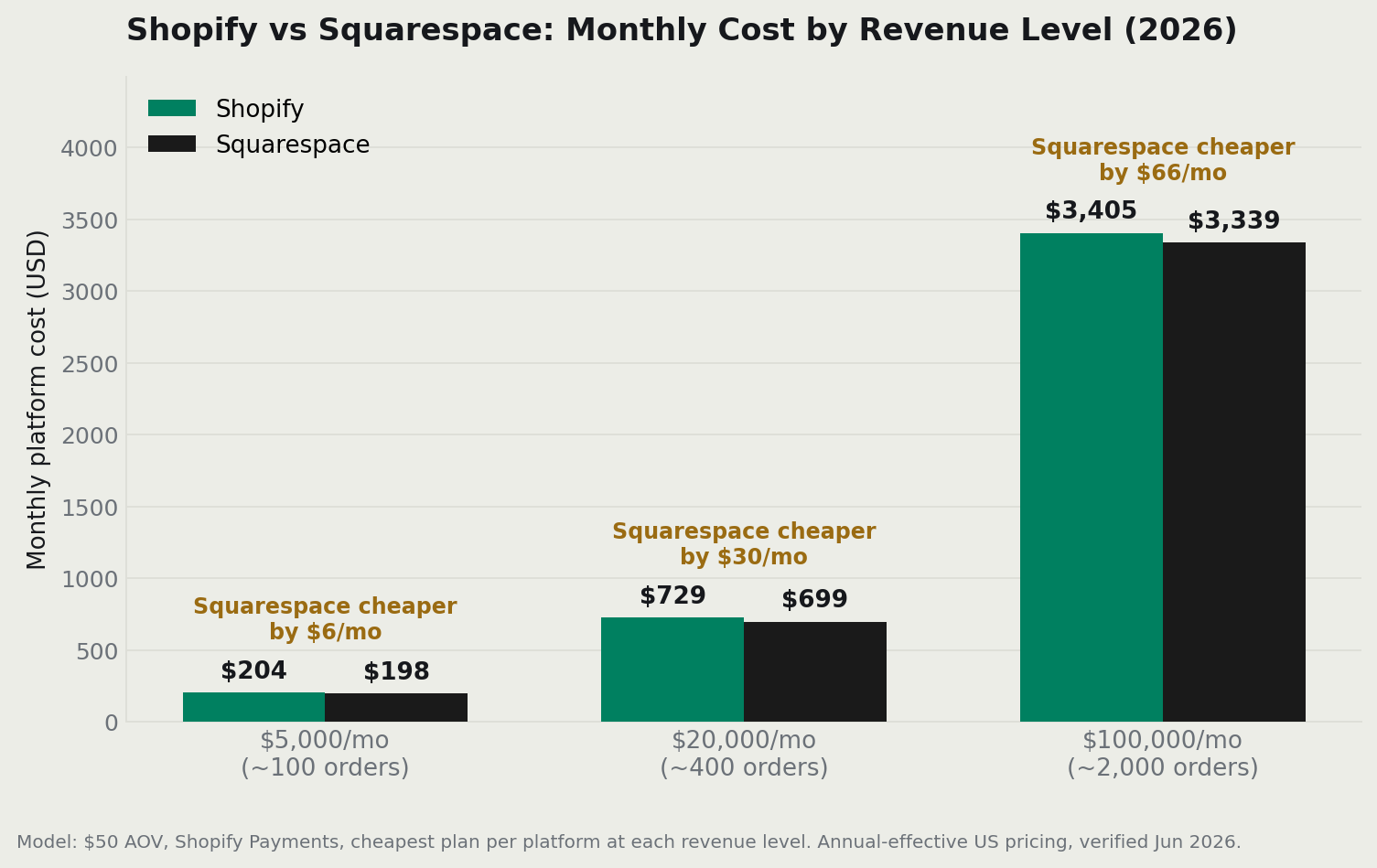
To show what this actually looks like, I modeled both platforms at three different revenue levels, using a $50 average order value and a plan on each that removes extra platform fees. (More on what those fees are in the next section.)
What a real store pays each month
| Monthly revenue | Shopify (plan + processing) | Squarespace Plus (plan + processing) |
|---|---|---|
| $5,000 (~100 orders) | Basic $29 + ~$175 = ~$204 | Plus $39 + ~$165 = ~$198 |
| $20,000 (~400 orders) | Basic $29 + ~$700 = ~$729 | Plus $39 + ~$660 = ~$699 |
| $100,000 (~2,000 orders) | Grow $105 + ~$3,300 = ~$3,405 | Plus $39 + ~$3,300 = ~$3,339 |
These are model estimates, not measured store data. Your actual cost depends on your order size, plan, and apps. Figures are approximate USD. Always verify current rates on each platform’s official pricing page.
What this tells you: Squarespace costs less at every revenue level — sometimes by a lot, sometimes by a little. If you’re looking strictly at platform cost, Squarespace wins. Full stop.
But here’s the catch: a cheaper platform doesn’t automatically mean more money in your pocket. Shopify’s selling tools — things like abandoned-cart recovery, multi-channel integrations, and thousands of apps — can lift your revenue by far more than the $50–$100/month cost difference. That’s the real argument for Shopify, and it’s a strong one for sellers who actually use those tools.
Who wins on cost: Squarespace. Who should pick Shopify anyway: sellers who need the tools to grow. The extra cost pays for itself — but only if you’re actually selling.
Sources: official Shopify pricing and Squarespace pricing pages; published Shopify Payments and Squarespace payment-processing rates. Cost figures are an independent model based on publicly available pricing — not measured store data.
Transaction fees, decoded (the myth that costs people money)
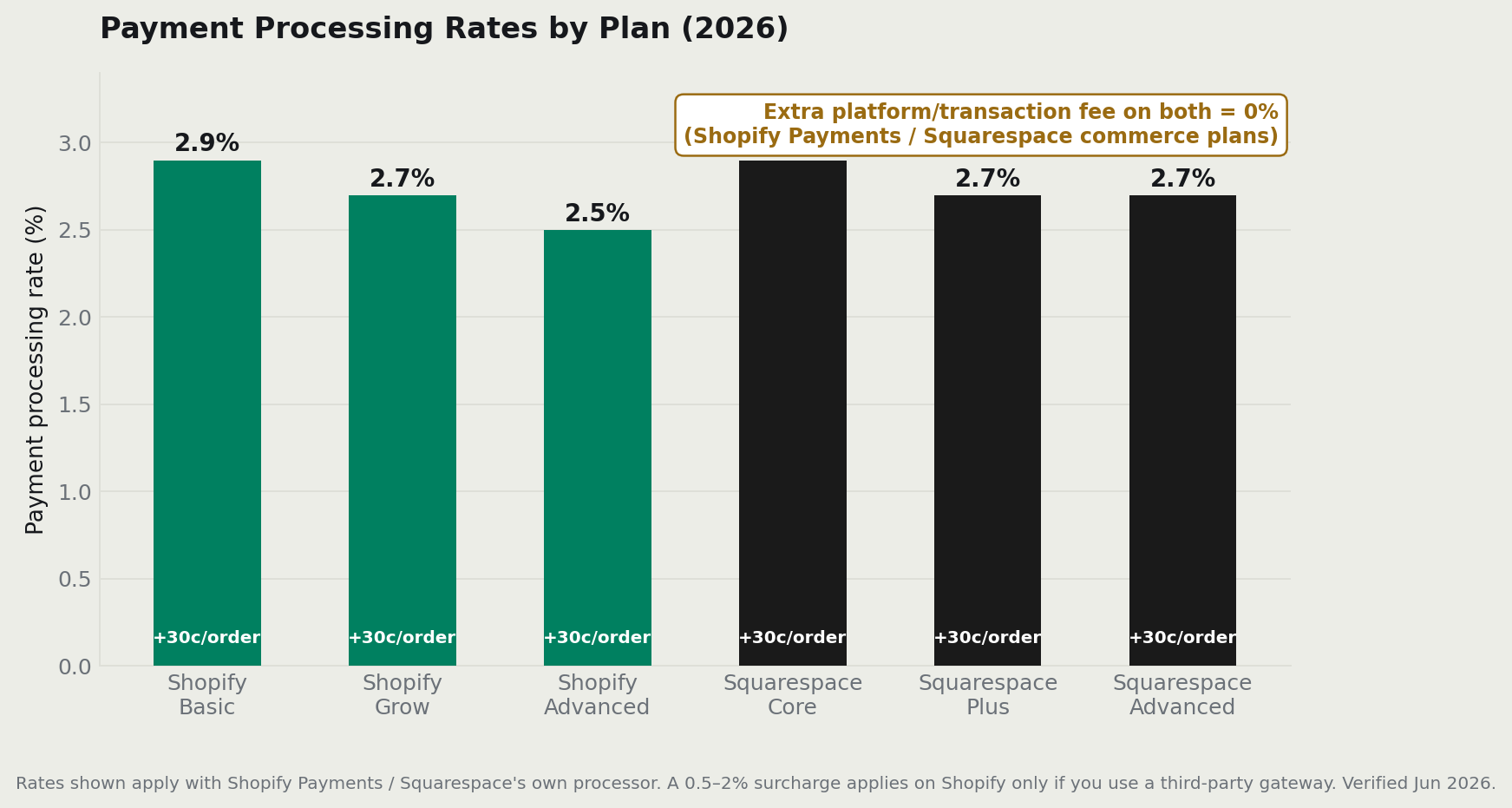
The short answer: both platforms can charge $0 in extra fees — if you’re on the right plan. This is probably the most misunderstood part of comparing the two.
Here’s the confusion: people say “Squarespace has no transaction fees, Shopify does.” That’s only half-true, and it leads to bad decisions.
Let’s break it down into plain English.
There are actually two kinds of fees — and they’re not the same thing:
- Platform fees — a cut the platform itself takes on each sale, on top of processing. This is the one people usually mean when they say “transaction fees.”
- Payment processing fees — what the payment processor (think Visa, Mastercard, Stripe) charges to handle the actual money. Both platforms charge this, always, on every sale. Nobody waives it.
Now, here’s what each platform actually does:
- Shopify charges 0% in platform fees as long as you use Shopify Payments — their built-in payment system. If you use a different payment provider instead, Shopify adds a small extra cut (roughly 0.5%–2% depending on your plan). Simple enough: use Shopify Payments, pay nothing extra.
- Squarespace also waives its platform fee — but only on its Plus and Advanced plans. If you’re on a lower tier, Squarespace may take a percentage of each sale. The exact number has been a bit murky since both platforms renamed their plans in 2025, so check the official page before quoting it.
What this means for you: pick the right plan on either platform and you pay zero in platform fees. The processing fee — usually around 2.9% + 30¢ per transaction — applies no matter what.
A quick example to make it concrete: if you’re selling on Squarespace’s entry commerce tier and paying a 3% platform fee on top of processing, that’s an extra $600 a month on $20,000 in sales — money you’re losing for no reason. At that point, upgrading your plan (or switching to Shopify) makes financial sense.
| Fee type | Shopify | Squarespace |
|---|---|---|
| Platform transaction fee (own processor) | 0% with Shopify Payments | 0% on Plus/Advanced; entry tier may carry a % fee |
| Surcharge for third-party gateway | ~0.5%–2% by plan | Limited gateway choice; processing still applies |
| Payment processing | 2.9% → 2.15% + 30¢ by plan | ~2.9%, 2.7% on Plus/Advanced, + 30¢ |
| Net “platform fee” achievable | 0% | 0% (right plan) |
Bottom line: “no transaction fees” is a selling point both platforms can honestly make — as long as you’re on the correct plan. Don’t choose a platform based on a fee that doesn’t exist once you read the fine print.
Sources: official Shopify Payments documentation and pricing page; Squarespace Help Center and pricing page. The exact entry-tier Squarespace fee is reported inconsistently after the 2025 rename — confirm on the official page before quoting it.
Pricing plans compared (and the rename mess)
The short answer: both platforms changed their plan names in 2025. Most comparison posts online still use the old names, which is why prices seem to contradict each other everywhere you look. When in doubt, check the live pricing page — not a review article.
What you need to know as a buyer:
All prices below are in US dollars (USD). Both platforms adjust their pricing pages by location, so if you’re outside the US, you may see different numbers. Switch the region selector on their sites to “United States” if you want to compare the figures below.
Shopify’s plans (2026, annual billing):
- Starter — ~$5/mo (for selling through social media or a link; no full website)
- Basic — ~$29/mo (your first real store; where most small sellers start)
- Grow — ~$105/mo (for stores doing significant volume)
- Advanced — ~$399/mo (for large stores that need detailed reporting and lower fees)
- Plus — from ~$2,300/mo (enterprise level; Shopify’s version of a big-business plan)
Payment processing on Shopify goes from 2.9% + 30¢ on Basic down to 2.15% + 30¢ on Plus.
Squarespace’s plans (2026, annual billing):
- Basic — ~$16/mo (a website with very light selling)
- Core — ~$23/mo (first real ecommerce option)
- Plus — ~$39/mo (removes the platform fee; this is the sweet spot for sellers)
- Advanced — ~$99/mo (adds subscriptions and abandoned-cart recovery)
One practical insight worth knowing: on Shopify, you don’t need to upgrade to Grow right away — even if your sales are growing. The Grow plan’s lower processing fees only start saving you money once your store is doing roughly $38,000+ per month. Below that, staying on Basic is actually cheaper. A lot of sellers upgrade too early and pay more than they need to.
| Tier | Shopify (annual effective) | Squarespace (annual effective) |
|---|---|---|
| Entry/site | Starter ~$5 (link/social only) | Basic ~$16 (site, light selling) |
| First real store | Basic ~$29 | Core ~$23 |
| Growth | Grow ~$105 | Plus ~$39 (0% platform fee) |
| Advanced | Advanced ~$399 | Advanced ~$99 |
| Enterprise | Plus from ~$2,300 | — (no enterprise tier) |
Sources: official Shopify pricing page; official Squarespace pricing page. Both platforms renamed plans in 2025–2026 — figures are annual-effective and should be re-verified at publish time.
Ease of use and setup
The short answer: Squarespace is easier to start. Shopify is easier to run once you’re selling.
They’re not easier at the same things.
If you’re building your first website and want something that looks good fast, Squarespace is genuinely more forgiving. You can have a polished, professional-looking site live in an afternoon. There’s not much that can go wrong.
Shopify is built around selling: managing products, tracking inventory, handling orders, setting up shipping. That means there’s more to learn upfront — but it’s more to learn because there’s more it can do, not because it’s poorly designed.
Real-world example: a photographer setting up a portfolio site with a shop for print sales will have a smoother experience on Squarespace. A clothing brand managing 200 SKUs, multiple warehouses, and daily orders will appreciate Shopify’s dashboard far more.
Who wins: Squarespace for beginners building simple sites. Shopify for anyone whose daily life will involve managing products and orders — its tools are built for exactly that.
Sources: official Shopify and Squarespace help documentation; seller community discussions.
Design and templates
The short answer: Squarespace wins on design. It’s not particularly close, and this isn’t an affiliate-driven opinion.
Squarespace was built around beautiful design, and that origin story still shows. Its templates are more polished out of the box, images look better, and a non-designer can produce something professional-looking without much effort. If you’re a wedding photographer, a florist, a jewelry maker, or anyone where visual presentation is part of the product — Squarespace is the better-looking platform.
Shopify’s themes have improved a lot, especially with their Online Store 2.0 update, which made themes faster and more flexible. They’re good. But “good” isn’t the same as “excellent,” and Squarespace has the edge if visual elegance with zero effort is what you’re after.
Real-world example: a candle brand wanting a minimal, editorial look will get there faster on Squarespace. A dropshipper selling electronics who cares more about product filtering and checkout speed will be fine on Shopify’s solid (if less glamorous) themes.
Who wins: Squarespace. Who should still pick Shopify: sellers who care more about conversion tools and selling features than about having the most beautiful site on the internet.
Sources: official Shopify theme store and Squarespace templates documentation.
Ecommerce features and the app ecosystem
The short answer: Shopify is in a different league for selling. The gap between the two is large.
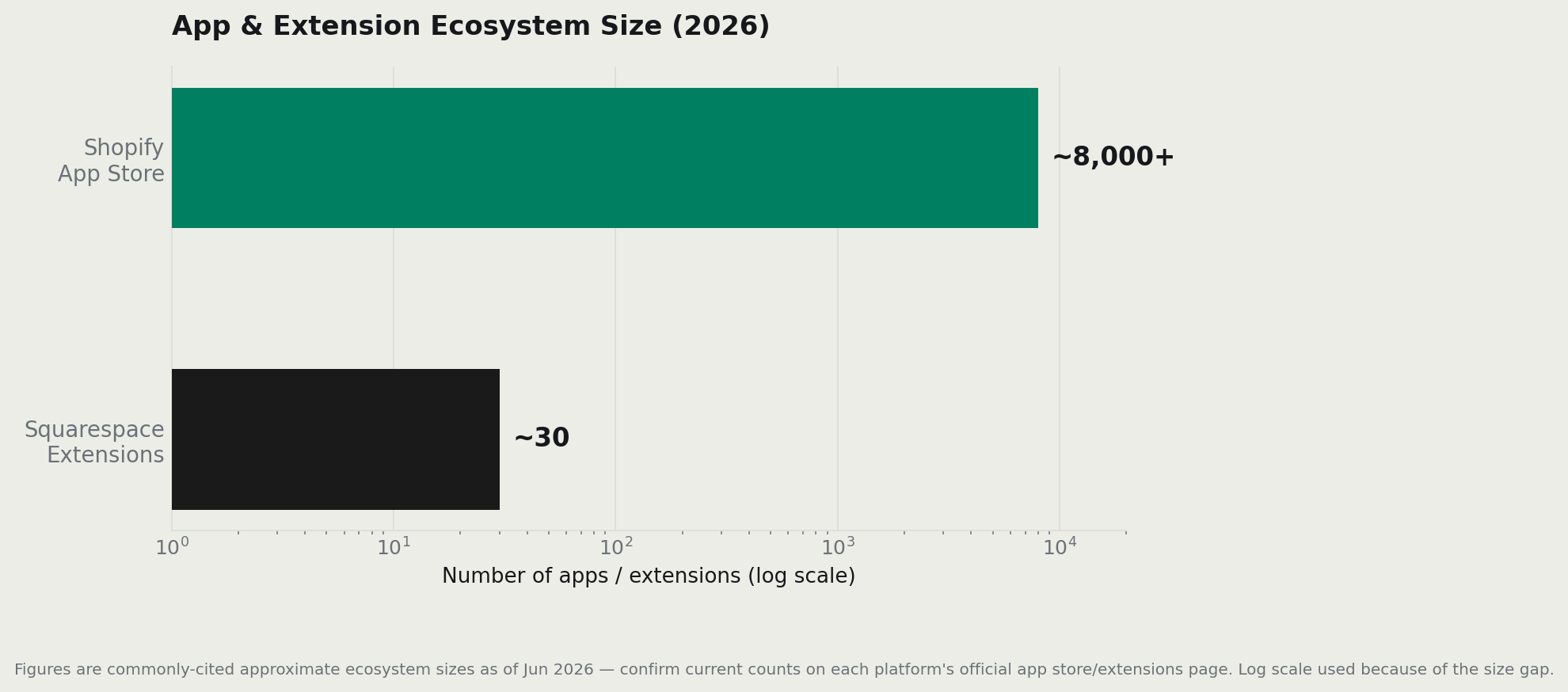
Shopify’s app store has thousands of add-ons — commonly cited around 8,000+ — covering pretty much anything a store could want: upsells, subscriptions, shipping calculators, accounting integrations, loyalty programs, dropshipping automation. You name it, there’s an app for it.
Squarespace offers a few dozen extensions. That’s enough for a simple store. It’s not enough for a store that needs to grow.
Beyond apps, Shopify’s native selling tools are stronger across the board: inventory and order management, multi-channel selling (selling on Instagram, TikTok, Amazon — all from one dashboard), point of sale for in-person selling, and a checkout that consistently ranks among the highest-converting in ecommerce.
Real-world example: a dropshipping store needs apps for product sourcing, automated order fulfillment, and price tracking. All of that exists in the Shopify ecosystem. On Squarespace, you’d hit walls almost immediately.
Who wins: Shopify, clearly, for anything beyond simple selling. Who should avoid it: a service business or creator who sells three products — you’d be paying for an engine you never rev. And if you sell handmade or vintage goods, the comparison you might actually want is a marketplace versus your own store I broke that down in Etsy vs Shopify.
| Ecommerce feature | Shopify | Squarespace |
|---|---|---|
| App / extension marketplace | Thousands (commonly cited ~8,000+) | A few dozen extensions |
| Inventory & order management | Advanced | Basic |
| Abandoned-cart recovery | Built-in (flexible flows) | On higher plans, simpler |
| Multi-channel selling | Strong (social, marketplaces, POS) | Limited |
| Point of sale (in-person) | Yes (Shopify POS) | Basic |
| International / multi-currency | Strong | Limited |
Sources: official Shopify App Store and features documentation; official Squarespace extensions and Help Center. App-count figures are commonly cited ranges — confirm current totals on the official stores.
AI tools: a quick, honest look
The short answer: both platforms have AI features. Neither is a reason to choose one over the other.
Shopify’s AI tools are built around selling — writing product descriptions, answering merchant questions, helping set up your store. Squarespace’s AI skews toward getting a site up fast — generating layouts and copy so you’re not starting from a blank page.
Both keep updating these features, sometimes monthly. I’m not going to overstate what they can do right now — by the time you’re reading this, the details may have already changed. Verify the live feature set on each platform’s site.
| AI feature area | Shopify | Squarespace |
|---|---|---|
| Branding | Shopify Magic + Sidekick assistant | Squarespace AI / AI writing assistant |
| Focus | Commerce: product copy, store help, merchant Q&A | Site setup: layout and copy generation |
| Email AI | AI-assisted campaign creation (Shopify Messaging) | AI-assisted email copy |
| Maturity | Expanding, commerce-led | Expanding, design-led |
Sources: official Shopify Magic / Sidekick pages; official Squarespace AI documentation. Feature sets change frequently — confirm current capabilities on each platform’s site.
Email marketing: Shopify Messaging vs Squarespace Email Campaigns
The short answer: Shopify’s email tool is better for stores. Squarespace’s is better for creators and newsletters. Both are a starting point — serious senders on either platform usually switch to a dedicated email tool eventually.
One thing both have in common: they price by how many emails you send per month, not by how many subscribers you have. That’s worth knowing — a big list isn’t necessarily an expensive list if you’re selective about when you email them.
Shopify Messaging (previously called Shopify Email) is built into every Shopify plan. You get 10,000 free emails per month. After that, it’s $1 per 1,000 emails sent — roughly a tenth of a cent each. Abandoned-cart emails are always free and don’t count toward that limit. The tool connects to your store data, so segmenting by purchase history or cart size is straightforward. Its weak spots: a limited template selection and fairly basic automation compared to dedicated email tools.
Squarespace Email Campaigns is a separate paid add-on — it doesn’t come included with your site plan. It’s priced in tiers based on how many emails you want to send per month. Every tier includes unlimited contacts and polished templates. The trade-off: automation is basic (welcome emails, simple follow-ups), there’s no A/B testing, and the entry tier keeps Squarespace branding in your footer.
Quick note on Squarespace email pricing: the exact tier costs have shifted since recent plan updates, and sources vary. Confirm current pricing on Squarespace’s official Email Campaigns page before quoting numbers.
Email marketing at a glance
| Factor | Shopify Messaging | Squarespace Email Campaigns |
|---|---|---|
| Included free? | Built into all plans; 10,000 free emails/mo | Separate add-on; 3-campaign trial |
| Pricing model | Pay-as-you-go: $1 / 1,000 emails after free tier | Tiered by monthly send limit |
| Contacts | Tied to your store customers | Unlimited contacts |
| Automation | Welcome, cart, post-purchase; Flow integration | Basic welcome/follow-up only |
| Segmentation | Basic, uses store customer segments | Limited |
| Templates | Store-branded, limited count | Premium templates included |
| A/B testing | Limited | Not available |
| SMS | Yes (charged separately) | No |
Who wins: Shopify for store owners — the free tier, store-data segmentation, and abandoned-cart automations are built for selling. Squarespace for creators and bloggers — unlimited contacts and nicer templates make more sense for a newsletter-style audience.
That said: once you’re doing real volume on either platform, a dedicated tool like Klaviyo or Omnisend will do more than either built-in option.
Sources: official Shopify Messaging / email marketing page and Shopify Help Center pricing; official Squarespace Email Campaigns Help Center. Exact Squarespace tier pricing should be confirmed on the official Email Campaigns page.
SEO: what each platform actually gives you
The short answer: both are solid for SEO basics. Where they differ is in blogging tools and scale — and that matters more than people think.
Forget vague claims like “Shopify is better for SEO” or “Squarespace ranks higher.” The platform is a relatively minor factor in your rankings. What moves the needle is your content, your links, and how well your product pages are structured — not which dashboard you’re logging into.
That said, the platforms do have real differences:
Both handle the fundamentals: editable page titles and meta descriptions, clean URLs, automatic SSL certificates, and mobile-friendly layouts. Neither is going to tank your SEO by existing.
Where Squarespace pulls ahead: its blogging and content tools are genuinely stronger. If you’re planning to drive traffic through articles, guides, or regular publishing, Squarespace makes that easier. For a photographer’s blog, a recipe site with a shop, or a service business that publishes weekly content — Squarespace’s content workflow is more natural.
Where Shopify pulls ahead: large product catalogs, structured data for products, and a huge app ecosystem for advanced SEO control. If you’re running 500 products and want fine-grained control over how they appear in search, Shopify scales better.
Real-world example: a fitness coach publishing weekly workout guides and selling a few programs will benefit more from Squarespace’s blogging tools. An apparel brand with 300 SKUs that needs structured product data and schema markup will appreciate Shopify’s ecosystem.
Who wins: Squarespace if content drives your traffic. Shopify if product scale does.
| SEO capability | Shopify | Squarespace |
|---|---|---|
| Editable titles & meta descriptions | Yes | Yes |
| Clean URLs | Yes (with /collections/, /products/ paths) |
Yes |
| SSL + mobile responsive | Yes (automatic) | Yes (automatic) |
| Blogging / content tools | Functional, basic | Stronger |
| Product/structured data at scale | Strong | Limited |
| Advanced SEO via apps | Large app ecosystem | Few options |
Sources: official Shopify SEO documentation and Squarespace SEO Help Center. Ranking outcomes depend far more on content and links than on platform, so I make no platform-level ranking claim.
Page speed: what really determines it
The short answer: the platform isn’t your speed problem. Your images and apps are.
Both Shopify and Squarespace are fully hosted, CDN-backed platforms — meaning they store and serve your site from servers around the world, optimized for fast loading. You’re not on cheap shared hosting where the server itself is the bottleneck.
What actually slows stores down — on either platform — is the same set of culprits: large uncompressed images, heavy themes, and on Shopify especially, too many apps running scripts in the background. Every app you install can add code that has to load before your page is fully ready.
Practical advice: instead of trying to pick the “faster” platform (the difference at the platform level is minimal), focus on compressing your images before upload and keeping your installed apps to only what you actually use. Then test your own store with Google PageSpeed Insights — that number describes your actual build, not some lab test on a different website.
Who wins: a wash at the platform level. The real speed winner is whoever keeps their images small and their app count lean.
Sources: official platform documentation on hosting and CDNs. I couldn’t find reliable, controlled public data comparing real-world page speed between the two platforms on identical stores — so I make no head-to-head speed claim and recommend testing your own build with Google PageSpeed Insights.
Which platform makes more money?
The short answer: Shopify, for sellers who are actually scaling. Squarespace, for sellers who aren’t.
This is the question underneath all the others, and it’s where the cost conversation gets interesting.
I showed earlier that Squarespace is usually the cheaper platform month-to-month. But cheaper to run and more profitable aren’t the same thing.
Shopify’s advantage isn’t a lower bill — it’s a higher ceiling. Things like:
- Abandoned-cart recovery — automatically emailing customers who left without buying. Even a modest recovery rate on $20k/month in abandoned carts adds up fast.
- Upsell and cross-sell apps — tools that increase how much each customer spends per visit.
- Multi-channel selling — selling through Instagram, TikTok, and Amazon from one dashboard.
- International selling — reaching customers in other countries with local currencies and tax handling.
A realistic example: if Shopify’s tools help convert 2% more visitors into buyers on a store doing $20,000/month, that’s an extra $400+ in revenue every month — for a platform that costs maybe $30–50 more per month than Squarespace. The math favors Shopify quickly for sellers who use those tools.
If your site sells a small amount on the side — say, a yoga instructor selling one online course — Shopify’s extra features sit completely unused, and Squarespace’s savings are real.
Who wins: Shopify for sellers whose revenue depends on selling features. Squarespace for low-volume or content-first businesses where those tools don’t matter.
Sources: official feature documentation for both platforms. I couldn’t find reliable, like-for-like public data on average revenue or conversion rates between the two platforms — the case above is based on feature capability and publicly documented tools, not a measured revenue comparison.
Migration: moving from Squarespace to Shopify
The short answer: it’s doable, but it takes time and planning. The biggest cost is often not the tools — it’s the work.
A really common pattern: someone starts on Squarespace because it’s easy and beautiful, grows into real ecommerce, then hits Squarespace’s feature ceiling and decides to move to Shopify. If you’re at that point, the move looks roughly like this:
- Export your products and customer data from Squarespace
- Set up your new Shopify store (themes don’t transfer — you’re rebuilding the design from scratch)
- Redirect your old URLs to the new ones (this is critical for SEO — skip it and you lose your search rankings)
- Move your domain over to Shopify
The technical process isn’t scary. The real cost is time — rebuilding your store, recreating your design, and making sure nothing breaks in the transition. If your redirects are sloppy, you’ll also take an SEO hit while Google figures out your new URL structure.
The practical lesson: if you already know you’re building a serious product store, it’s worth starting on Shopify and skipping the migration entirely. The “start cheap on Squarespace and move later” plan sounds smart but ends up costing more in time and risk.
Who should migrate: Squarespace sellers who’ve hit real limits — needing proper inventory management, international selling, or apps that don’t exist in Squarespace’s ecosystem. Who shouldn’t: anyone whose Squarespace store is working fine. Don’t switch platforms just because you read an article about Shopify.
Planning a move? Start a free Shopify trial and rebuild at your own pace
Sources: official Shopify migration documentation and Squarespace export Help Center; seller community discussions on migration experience.
Which scales better?
The short answer: Shopify, and it’s not even close.
Shopify runs stores from first sale to enterprise-level, handling large product catalogs, high order volumes, and international operations. Squarespace is excellent for small and medium stores, then starts to show its limits as you grow — fewer integrations, lighter international tools, and a ceiling on how much you can extend or customize.
Real-world example: an apparel brand at $500k/year in revenue will feel the walls on Squarespace: limited app options for inventory management, no multi-currency checkout, minimal automation. The same brand on Shopify has room to grow into Shopify Plus and a full enterprise stack.
Who wins: Shopify, clearly, for anyone with serious growth plans.
| Scalability factor | Shopify | Squarespace |
|---|---|---|
| Catalog size | Large catalogs handled well | Better for small/medium |
| High order volume / traffic spikes | Built for it | Adequate, lighter |
| Enterprise tier | Shopify Plus | None |
| Integrations to grow into | Thousands | Few dozen |
| International expansion | Multi-currency, tax tools | Limited |
Sources: official Shopify Plus and platform documentation; official Squarespace feature pages.
Customer support: which gets you help faster?
The short answer: Shopify gives you more ways to get help. Squarespace’s written support is more thorough when you do get it.
Support rarely matters — until something breaks mid-sale. Here’s what each platform actually offers:
Squarespace keeps things simple: email and ticket support around the clock, live chat with a human agent on weekdays (roughly 4am–8pm ET), and no phone option on any plan. What it lacks in channels it tends to make up for in quality — its help center is well-documented, image-rich, and often cited as genuinely useful. There’s also a community forum and Squarespace Circle for designers.
Shopify leans on 24/7 live chat across all plans, backed by a very large help center available in many languages, an active community forum, Shopify Academy for learning, and the Shopify Experts marketplace if you need paid professional help. One thing worth flagging: phone support availability has narrowed over time. Based on current sources, phone and priority support appear to be concentrated on higher-tier and Plus plans. Since this has changed more than once, check Shopify’s official contact page to confirm what your specific plan includes.
Real-world example: it’s 11pm on a Friday and your checkout is broken. On Shopify, you have 24/7 live chat available. On Squarespace, you’re waiting until Monday for live chat — though email support is still available.
Support at a glance
| Channel | Shopify | Squarespace |
|---|---|---|
| Live chat | 24/7 on all plans | Weekdays only (~4am–8pm ET) |
| Phone | Narrowed — higher/Plus tiers (verify) | None |
| Email / ticket | Available (availability varies by plan) | 24/7 |
| Help center | Very large, many languages | Strong, image/video-rich |
| Community / forum | Large + Shopify Experts | Forum + Squarespace Circle |
| Documentation quality | Broad, fewer screenshots | Detailed, visual |
Who wins: Shopify for availability — 24/7 chat on every plan matters when something is actively costing you sales. Squarespace wins on the quality of written documentation. For an active store where downtime is expensive, Shopify’s edge here matters.
Sources: official Shopify Help Center and contact page; official Squarespace Help Center and contact documentation. Shopify’s phone/email availability by plan has changed recently — verify current terms on the official contact page.
Common beginner mistakes (both platforms)
Most of these come up repeatedly in seller communities. Avoid them and you save money and frustration.
- Picking the wrong plan. Squarespace sellers on a fee-carrying entry tier paying a platform percentage they didn’t realize was there. Shopify sellers upgrading to a higher plan before their sales volume actually justifies it. Both cost real money.
- Confusing platform fees with processing fees. These are two different things. Processing fees always apply. Platform fees can be avoided on the right plan. People pick the wrong platform based on a fee that turns out to not exist — or doesn’t exist on the plan they’d actually use.
- Choosing Shopify for a portfolio or simple service site. You’ll spend time learning tools you never use. Squarespace is the better fit.
- Choosing Squarespace for a serious product business because it’s “easier.” Easier now, migration headache later.
- Installing too many Shopify apps. Every app adds cost and can slow your store. Install what you need, audit occasionally, and remove what you’re not using.
What happens after a year?
On Squarespace: if you stayed small and content-first, you’re happy and your bill is low. If you grew into real ecommerce, this is usually when the feature ceiling starts to pinch — not enough integrations, no advanced inventory tools, limited international options — and migration talk begins.
On Shopify: if you’re selling seriously, the ecosystem has paid off and you’ve grown into the tools. If you bought Shopify for a tiny shop that didn’t need it, you’ve been overpaying for capacity you don’t use.
The pattern is consistent: the platform that fits where you’re going — not just where you’re starting — is the one you’ll be happy with at month 12.
What sellers actually complain about (community sentiment)
These are recurring themes from seller communities, not cherry-picked quotes.
- About Shopify: app costs add up over time; the base plan feels limited until you start paying for add-ons; there’s a real learning curve at the start.
- About Squarespace: the selling tools hit a ceiling faster than expected; fewer integrations than sellers need as they grow; growth-stage sellers feel boxed in.
Notice the pattern: Shopify complaints are about cost and complexity. Squarespace complaints are about limits. That’s the whole tradeoff summarized — capability vs simplicity. Which side of that you fall on tells you which platform to pick.
Sources: recurring themes in public seller communities and forums (e.g. r/shopify, r/squarespace, platform community boards). Synthesized from publicly available discussions; no individual posts are quoted.
Biggest misconceptions
Shopify charges transaction fees, Squarespace doesn’t.” Both platforms can reach 0% in platform fees — on the right plan. Both always charge payment processing fees. The difference is about plan tiers, not platform philosophy.
“Shopify is cheaper because it’s built for ecommerce.” It’s usually the pricier platform, all-in. It wins on value and capability, not on the monthly bill.
“Squarespace can’t do ecommerce.” It can — and for small to medium stores, it does it well. The limits show up at scale, not at the start.
“The platform is what determines your SEO and page speed.” Your content, links, images, and app choices matter far more than which logo is in your browser tab.
A few things that surprised me in the data
- Squarespace beats Shopify on cost across the entire revenue range. I expected a crossover point where Shopify becomes cheaper at high volume. On pure platform cost, it basically never does.
- The 2025 plan renames created a lot of confusion. Half the “current” pricing comparisons online reference plans that no longer exist by those names. Always check the live pricing page.
- Staying on Shopify Basic is cheaper far longer than most guides suggest. The upgrade to Grow pays off later than people think — most sellers are fine on Basic well past the point they expected to move up.
Who should choose what
| You are… | Better pick | Why |
|---|---|---|
| First-timer, simple site | Squarespace | Easier, cheaper, prettier defaults |
| Creator / portfolio / blog | Squarespace | Design + content tools win |
| Small product store, light volume | Either | Squarespace cheaper; Shopify more room to grow |
| Serious / scaling ecommerce | Shopify | Apps, conversion, scale |
| Dropshipper | Shopify | Ecosystem + integrations |
| Selling internationally | Shopify | Multi-currency, tax tooling |
| Service business / bookings | Squarespace | Built-in scheduling, simpler |
| Agency building client stores | Shopify | Partner program, repeatability |
Pros and cons
Shopify — pros: best-in-class selling tools, huge app ecosystem, scales to enterprise, 0% platform fee on Shopify Payments, strong international features. Shopify — cons: usually pricier all-in, app costs add up, steeper learning curve, weaker native blogging.
Squarespace — pros: beautiful templates, easier for beginners, often cheaper platform cost, strong content/blogging, good for services. Squarespace — cons: limited apps/integrations, weaker for large or international stores, hits a ceiling as you scale.
Expert verdict
Squarespace is the better website builder and the cheaper platform. Shopify is the better store — and for anyone whose income depends on selling and scaling, the small cost premium buys tools that earn it back many times over. Choose for where you’re going, not just where you start. If that’s a real, growing store, Shopify is the right call — and you can [start a free trial here] before paying anything.
FAQ
Is Shopify or Squarespace better? Shopify vs Squarespace comes down to your goal. Shopify is better for serious, scaling, or international ecommerce. Squarespace is better for design-led sites, creators, and light selling — and it’s usually the cheaper platform.
Does Squarespace really have no transaction fees? Only its platform fee is waived, and only on certain plans (Plus/Advanced). Payment processing fees (~2.9% + 30¢) still apply, just like on Shopify. Shopify’s platform fee is also 0% when you use Shopify Payments.
Which is cheaper, Shopify or Squarespace? On platform cost, Squarespace usually edges it if you’re on its 0%-fee plan. Shopify often costs a little more but delivers more selling capability per dollar.
Can I migrate from Squarespace to Shopify? Yes. You export products and content and rebuild on Shopify (themes don’t carry over). Set up URL redirects to protect your SEO, then move your domain.
Is Squarespace easier than Shopify? For building a simple, attractive site, yes. For managing a busy store, Shopify’s selling-focused dashboard is the better tool.
Shopify vs Wix vs Squarespace — where does Wix fit? Wix is the third option buyers often weigh. Roughly: Squarespace for design, Shopify for serious selling, Wix for flexible general sites on a budget. (Full three-way breakdown in my companion guide.)
Sources: official Shopify and Squarespace pricing documentation; published payment-processor rates; seller community discussions. Figures verified June 2026 — confirm current pricing on each platform’s site before purchasing.